Private, browser-based measurement
Free Online Ring Sizer
Have a ring that fits? Match it on your screen. No ring? Wrap and mark a paper strip, then measure its length. Choose a method below and see exactly what to do before you start.
- Free
- No signup
- Private in your browser
- Works on phone
Option 1 · I have a ring
Measure a ring on your screen
You’ll need a round ring that fits the intended finger, plus a standard bank card or physical ruler to calibrate your screen. No paper or string needed.
1Choose a ring that fits
Use a round ring that fits the finger you want to size. Have a standard bank card or ruler ready to calibrate your screen.
2Match the inside edge
After calibration, lay the ring flat on the screen. Adjust the circle until its inner edge matches the ring’s inside opening. Ignore the outside of the band.
3Lift, repeat, then check
Lock the first reading. Lift and reposition the ring, then match it again. The tool checks agreement before showing your measurement.
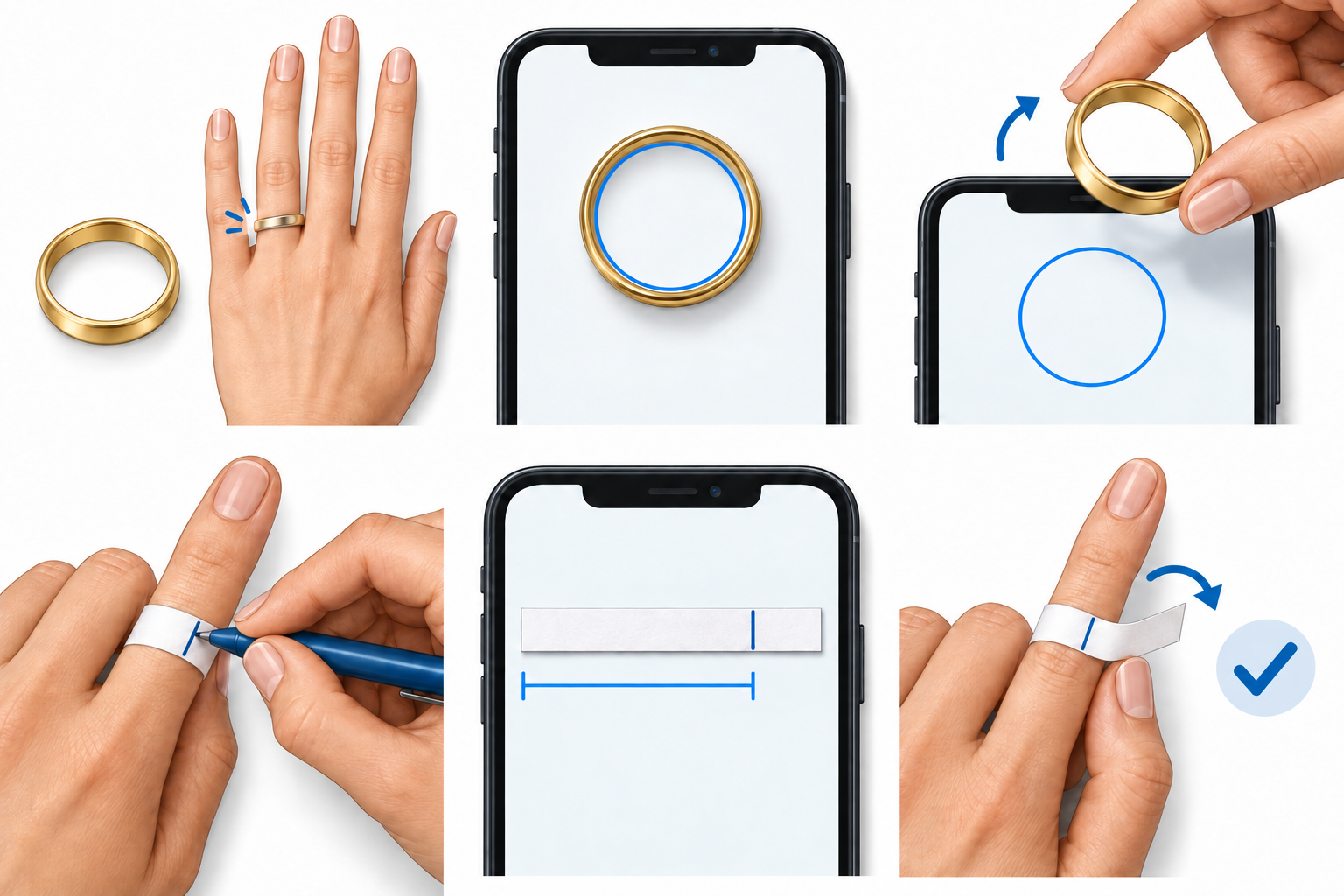
Illustrations are not to scale. Use the live tool after calibrating your screen.
Option 2 · I don’t have a ring
Measure without an existing ring
You’ll need a thin strip of paper, a pen, and a standard bank card or ruler for calibration. Non-stretch string can replace the paper: wrap, mark, then straighten it gently without pulling it longer. Avoid elastic or stretchy thread.
1Wrap and mark
Wrap a thin paper strip around the base of your finger, snug without squeezing. Mark where the starting end overlaps. Check that the loop can pass over your knuckle.
2Flatten and match
Calibrate your screen with a standard bank card or ruler. Lay the strip flat without stretching. Align its starting end with START and adjust MARK to your pen mark, not the end of the strip.
3Make a fresh wrap
Lock the reading, then wrap and mark again. Measure the new marked length to check agreement and see your estimated finger circumference.
Illustrations are not to scale. Use the live tool after calibrating your screen.
Measure the marked strip or string on your screen to find your finger's circumference.
What will I get?
Once your measurements agree, see your US ring size, regional equivalents, and inside diameter and circumference in millimetres.
More ways to find your size
Use the calculator with a measurement you already have, or compare regional sizes in the full ring-size chart.
Prefer paper? Download the printable sizer. Our measuring guide walks through each method, and the methodology explains our sources and checks.
Frequently Asked Questions
How does the online ring sizer work without an app or account?
The tool calibrates your screen physical pixel density using the short edge of any standard plastic card (ISO/IEC 7810 ID-1 standard: 53.98 mm) or a physical millimeter ruler. Once calibrated, it generates mathematically exact circular sizing outlines on your screen so you can place an existing ring directly on the glass to determine its inside diameter.
How accurate is measuring a ring on my phone or computer screen?
When calibrated with a standard bank card or millimeter ruler, on-screen ring measurement achieves precision within 0.1 mm. The tool enforces repeat measurement verification checks to ensure repeatability conforming to the international ISO 8653:2016 standard.
What should I do if my ring size falls between two sizes?
If your measurement falls between two standard sizes, we recommend selecting the larger size, particularly for ring bands wider than 4 mm which fit more snugly. Finger volume naturally fluctuates slightly throughout the day due to temperature and hydration.
Is my screen calibration or ring measurement private?
Yes, 100% private. All calibration factors, ring measurements, and unit conversions are processed entirely inside your browser's local memory. No camera access, photos, personal data, or measurement values are ever recorded or transmitted over the network.